

SonarQube Masterclass From Basics to Advanced
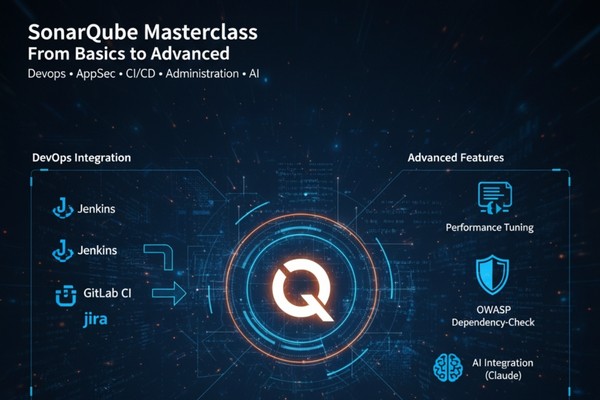
Purpose | To provide expert-level mastery of SonarQube, covering installation, administration, DevOps integration, and advanced features like performance tuning and AI integration. |
Audience | DevOps/QA/AppSec Engineers, Senior/Lead Developers, and System Administrators responsible for software quality and security. |
Role | DevOps Engineer, QA Engineer, Application Security Specialist, Lead Developer, System Administrator. |
Domain | DevOps |
Skill Level | Intermediate |
Style | Deeply technical and hands-on, with extensive labs covering installation, administration, and pipeline integration. |
Duration | 14 to 20 hours |
Related Technologies | SonarQube, Jenkins, GitLab CI, Nginx, Jira, OWASP Dependency-Check, Claude (AI) |
Course Description
This comprehensive SonarQube course is designed to take you from foundational knowledge to expert-level mastery in static code analysis. You’ll learn everything from SonarQube installation and architecture to deep integration with DevOps pipelines. The curriculum covers critical concepts like Quality Gates, issue management, and security scanning, all demonstrated with real-world projects. You will also master advanced administrative tasks, including upgrade strategies, performance tuning, troubleshooting, and leveraging new AI-driven features to maintain impeccable code quality across your organization.
Who is this course for
This course is designed for IT professionals who are responsible for building, maintaining, or improving software quality and security. It is ideal for:
DevOps Engineers: Who want to integrate automated code analysis into CI/CD pipelines.
Software Developers (Senior & Lead): Who are responsible for setting and enforcing code quality standards within their teams.
QA Automation Engineers: Who wish to shift quality checks earlier into the development lifecycle ("shift-left").
Security Professionals (AppSec): Who use static analysis to identify vulnerabilities.
System Administrators: Who are tasked with installing and maintaining a SonarQube instance.
Course Objectives
Upon successful completion of this course, you will be able to:
Install and Administer SonarQube: Set up, configure, and secure a production-ready SonarQube server.
Integrate with DevOps Pipelines: Automate code scans within CI/CD tools like Jenkins or GitLab CI.
Enforce Code Quality: Create and customize Quality Profiles and Quality Gates to meet your team's standards.
Analyze and Manage Issues: Triage and manage bugs, vulnerabilities, and code smells reported by SonarQube.
Scan Diverse Projects: Configure scans for various project types, including multi-language monorepos.
Perform Advanced Operations: Execute upgrades, monitor server health, tune performance, and integrate with tools like Jira and OWASP Dependency-Check.
Prerequisites
To get the most out of this course, you should have:
Fundamental Software Development Knowledge: An understanding of the software development lifecycle.
Basic CI/CD Concepts: Familiarity with the purpose of CI/CD pipelines (e.g., Jenkins, GitLab CI).
Command-Line Proficiency: Comfort working in a Linux or Windows terminal.
Basic Programming Familiarity (Helpful): Knowledge of at least one programming language (e.g., Java, Python, JavaScript) will help in understanding the scan results.
Course outline
Section 1: Introduction to Static Scanning
Purpose and Benefits of Static Code Analysis
Common use cases in enterprise environments
Overview of Languages and Ecosystems Supported
Section 2: SonarQube Features & Architecture
Core Components: Server, Scanner, and Database
SonarQube Editions: Community vs. Developer/Enterprise
Understanding Permissions, Tokens, and User Roles
Section 3: SonarQube Installation and Configuration
Hands-on Lab: Installing a SonarQube Server
Hands-on Lab: Setting up Nginx in SonarQube server
System Requirements for Sonarqube
Sonarqube Setup Best Practices
Hands-on Lab: Configuring Server Settings and Security
Hands-on Lab: User Management and Permissions
Hands-on Lab: Setting up Email Notifications
Section 4: Sonar scanner and Sonar UI
Hands-on Lab: Installing the Sonar Scanner
Hands-on Lab: Running Your First Code Scan
SonarQube Dashboard Overview
Hands-on Lab: Managing Issues (Create User, Assign, Change Status)
Section 5: DevOps Pipeline with project walkthrough
Hands-on Lab: Setting up Rate Limiting for Nginx
Section 6: Quality Gates and Quality Profiles
What are Quality Profiles?
Hands-on Lab: Customizing Rules in a Quality Profile
What are Quality Gates?
Hands-on Lab: Creating a Custom Quality Gate
Section 7: Issue Types and Severity Model
Issue Classification: Bugs vs. Vulnerabilities vs. Code Smells
Common Issue Types and How to Fix Them
Understanding Severity Levels (Blocker, Critical, Major, etc.)
How Severity Impacts Quality Gates
When to Suppress or Justifying Issues
Section 8: Working with various projects on Sonarqube
Hands-on Lab: Configuring MonoRepo in Sonarqube
Section 9: Improving and Maintaining Code Quality
Using Project History to Track Codebase Improvement
Understanding SonarQube’s Technical Debt Calculation
Strategies to Reduce Long-Term Debt
Hands-on Lab: Integrating OWASP Dependency-Check
Section 10: Upgrade Strategy and Compatibility
Strategies of Upgrading the Database
Ensuring Minimal Downtime during Upgrades
Integration: Automatically Creating Jira Tickets from SonarQube Scans
Section 11: Monitoring and troubleshooting sonarqube
Hands-on Lab: Reading and Understanding SonarQube Logs
Common Failure Modes and Their Resolutions
Section 12: Best Practices and Tips
Hands-on Lab: Performance Tuning and Horizontal Scaling
Maintenance Tasks for SonarQube Administrators
Section 13: AI features in Sonarqube
Hands-on Lab: Connect SonarQube MCP Server via Claude Desktop
Sample Prompts for SonarQube MCP Server